Date and hour timeline
Jump to a day or hour instead of repeatedly scrolling through one long list of visits.
 Free browser extension · History management
Turn scattered browsing trails into a personal, searchable archive
Manage history in one clear timeline with precise search, batch actions, CSV / HTML exports, domain rules, and automatic cleanup.
 Chrome / Chromium
 360 Secure Browser
 360 Extreme Browser
 Sogou Browser
 Quark Browser
 QQ Browser
 Edge
Edge Firefox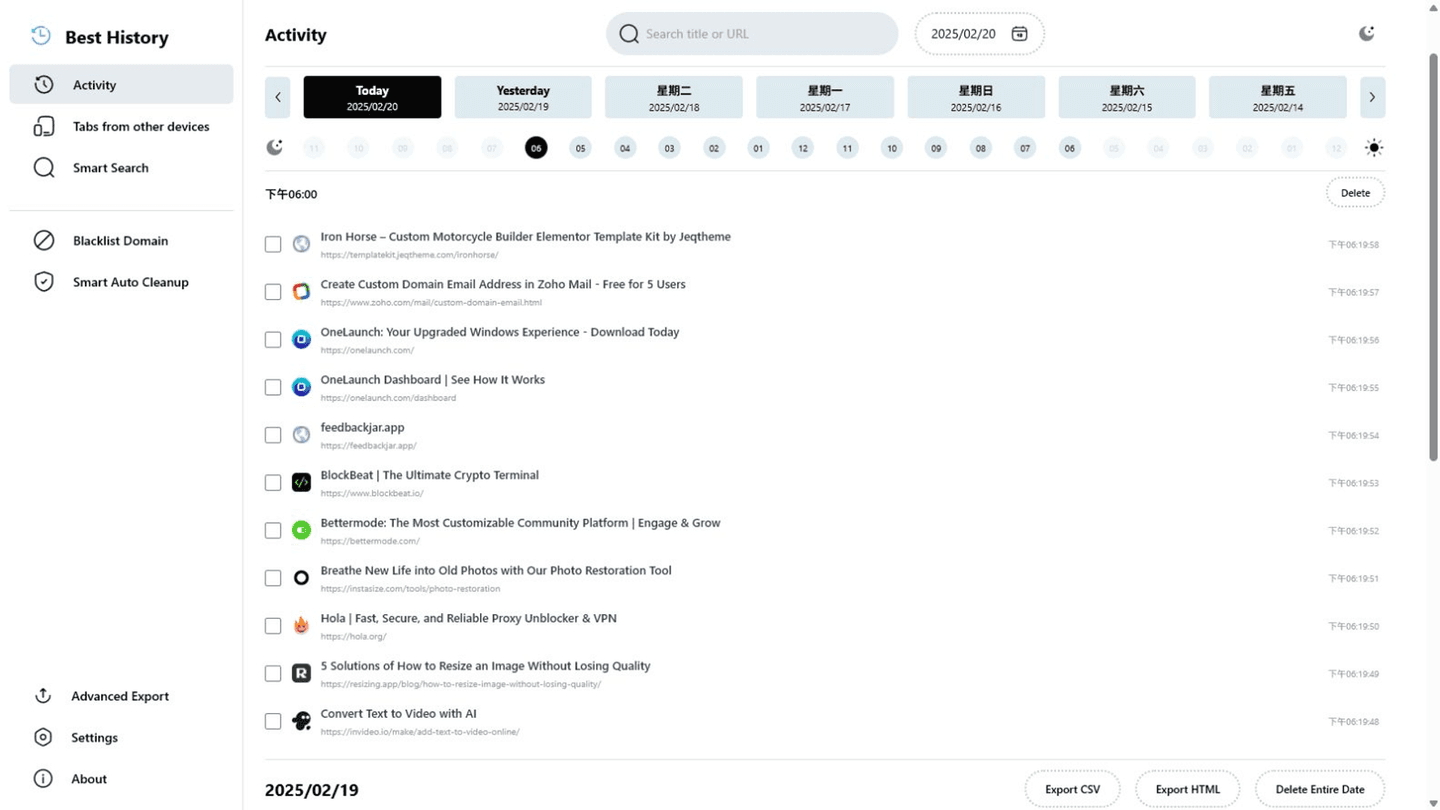
The browser's built-in history page is fine for a tab you just closed, but it becomes difficult when the visit was weeks or months ago. Best History organizes visits by date and hour, lets you search titles, URLs, domains, keywords, or regular expressions, and gives you batch tools to export, delete, and manage the results.
Jump to a day or hour instead of repeatedly scrolling through one long list of visits.
Search page titles, URLs, and domains with case options and regular expressions when needed.
Act on one visit, several visits, or the current results by URL, time, date, or domain.
Export selected visits, search results, or a custom date range for backup and later reference.
Automatically clear sites you do not want to keep while protecting important domains or pages.
Choose a schedule and retention period so accumulated history follows your rules.
Optionally review time spent on sites and session details, then export your personal time data.
Reopen recently closed tabs and view sessions that your browser sync provides from other devices.
Best History turns “I remember seeing it somewhere” into a clear workflow. Locate the time and content, act on the results, and let repeatable rules handle future maintenance.
Start with a date and hour to return to the approximate time of the visit.
Combine titles, URLs, domains, keywords, or regular expressions to remove unrelated visits.
Reopen useful pages, or batch-export, delete, and assign domain rules.
Configure retention, lists, and cleanup schedules to reduce repeated manual work.
History views, preferences, cleanup rules, and optional time insights are processed in your browser. No account is required, and you do not have to hand your complete browsing history to an online service.
Search, filtering, export, and cleanup use the history capabilities provided by your browser.
Time-spent tracking is optional and requests its additional permission only when you enable it.
Save important visits as CSV or HTML first; deletion may sync across devices and cannot be undone.
Best History can only read visits your browser still retains and exposes to extensions; cleared history cannot be recovered.
For people who often retrace research, courses, products, or work pages—and anyone who needs regular backups, large-history organization, or more deliberate control over local browsing privacy.
Answers about downloads, installation, supported platforms, and everyday use.
The built-in page is convenient for quick recent lookups. Best History is designed for larger histories with combined search, date and hour navigation, batch actions, CSV / HTML exports, domain rules, and automatic cleanup.
Export selected visits, current search results, or all retained visits within a full or custom date range as CSV or HTML. Browser extension APIs do not support importing that file back into browser history.
Cleanup follows the schedule and retention period you choose, while allowlists can protect specified domains. Start with a longer retention period and a small set of rules, and export important visits before deletion.
Core history management runs locally in your browser. Refer to the product privacy policy and installation page for exact permission and data-handling details.
No. Best History can only read visits that your browser still retains and exposes to the extension. History removed by the browser or a cleanup rule cannot be recovered.
This site lists packages for Chrome, Edge, and Firefox. The Chrome package also supports the compatible Chromium-based browsers listed on this page.
Use the Chrome, Edge, or Firefox package listed on this product page. Chrome and Edge users can also install it from the respective web store of each browser. Avoid packages from untrusted third-party sites.
Choose a complementary tool when your content or task size changes.

Import Taobao and other product links from your own store or expressly authorized pages, then review and batch-download main, SKU, detail images and videos.

Open a Taobao or other product page from your own store or an expressly authorized page, then batch-select and save media you have the right to use.

Batch-find, filter, and save images, video, and audio from pages where you have lawful permission, including authorized product pages.
Download the Best History browser-history manager for Chrome, Edge, or Firefox and verify the listed source before installation.
View details Best History · How to useUse the timeline, combined filters, batch exports, domain rules, cleanup, statistics, and sessions safely.
View details Best History · ComparisonCompare filters, batch actions, exports, domain rules, and statistics with the built-in page.
View details